
SolidWorks CAM: Integrating Design and Manufacturing for Smart Production
The information is currently being reviewed and updated. If you notice any errors or inaccuracies, please let us know.
Overview
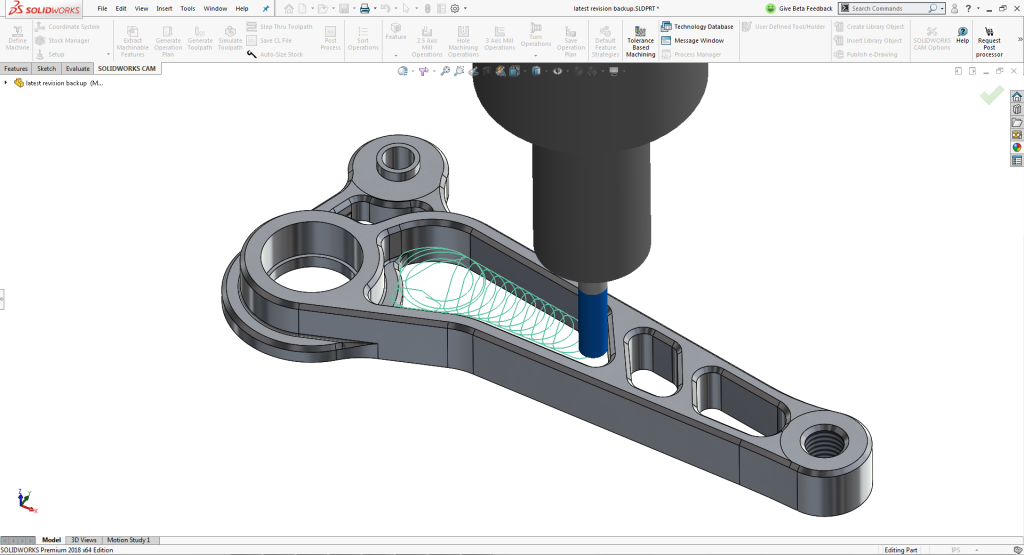
SolidWorks CAM is a computer-aided manufacturing (CAM) software add-on for the popular SolidWorks 3D CAD platform. Developed by Dassault Systèmes under the SOLIDWORKS brand, SolidWorks CAM allows engineers and machinists to generate toolpaths and CNC machining code directly within the SolidWorks design environment. Introduced in 2017 as part of the SolidWorks 2018 release, it was created to bridge the gap between design and manufacturing, enabling a seamless design-to-manufacturing workflow. This integration means users can design a part and immediately prepare it for machining without exporting data to a separate CAM program.
SolidWorks CAM is powered by CAMWorks – a CAM technology that had long been a Gold Partner solution for SolidWorks – which brings decades of CAM development into the SolidWorks ecosystem. Dassault Systèmes (the French software company behind SOLIDWORKS) positioned SolidWorks CAM as a key component of its “smart manufacturing” strategy, aiming to help companies accelerate product development and reduce errors by uniting CAD and CAM in one platform.
As a product of Dassault Systèmes, SolidWorks CAM benefits from the backing of one of the world’s largest engineering software vendors. Dassault Systèmes acquired the SolidWorks Corporation in 1997, and SOLIDWORKS has since grown into a global leader in 3D CAD with over seven million users worldwide. By embedding CAM capabilities into SolidWorks, Dassault Systèmes expanded its portfolio beyond design into manufacturing, aligning with the company’s mission of providing end-to-end solutions from concept to production. SOLIDWORKS CEO Gian Paolo Bassi described this vision, saying “SOLIDWORKS 2018 brings more than just a smarter approach to manufacturing parts or products, it helps businesses translate imagination into innovation and build ecosystems.” In essence, SolidWorks CAM’s introduction was driven by industry demand for tighter CAD/CAM integration and Dassault’s strategic goal to support a complete digital workflow for its customers.
Applications Across Industries
SolidWorks CAM is used across a wide range of industries wherever CNC machining and product design intersect. Because it operates inside the SolidWorks CAD platform, it naturally appeals to the vast user base of SolidWorks in sectors such as:
-
Industrial Machinery and Equipment: Machine shops and equipment manufacturers use SolidWorks CAM to program milled parts, brackets, enclosures, and machine components directly from their SolidWorks designs. The integrated approach helps ensure that design updates to machinery parts automatically update the machining instructions, reducing fabrication errors.
-
Aerospace and Defense: Companies designing aircraft parts, satellite components, or defense equipment leverage SolidWorks CAM to quickly generate toolpaths for complex milled or turned components. The software’s ability to handle tight tolerances and to incorporate model-based definition (PMI data) makes it useful for high-precision aerospace machining.
-
Automotive and Transportation: In the automotive industry, engineers use SolidWorks CAM to produce tooling, engine components, and custom parts. The integration with SolidWorks allows design and manufacturing teams to collaborate on parts like brackets, molds, and jigs, streamlining prototyping and reducing lead times in vehicle development.
-
Consumer Products and Electronics: Manufacturers of consumer goods, electronics, and appliances take advantage of SolidWorks CAM for creating molds, plastic injection tooling, and detailed metal or plastic parts. Because SolidWorks CAM works within the familiar CAD interface, design engineers in these industries can validate manufacturability early by generating machining simulations for their product parts.
-
Medical Devices and Healthcare: Firms producing medical devices, prosthetics, or surgical tools utilize SolidWorks CAM to machine components with complex geometries and stringent quality requirements. The software’s knowledge-based machining ensures that proven processes and surface finish requirements (critical in medical parts) are consistently applied.
Beyond these examples, any industry that involves designing parts in SolidWorks and then cutting those parts on CNC machines can benefit from SolidWorks CAM. From robotics startups machining prototype parts, to large manufacturing enterprises doing in-house fabrication, the software supports applications from simple 2.5-axis milling of prismatic parts up to indexed 5-axis machining of more complex geometries. Its broad applicability is one reason Dassault Systèmes included SolidWorks CAM for all users on subscription service – to encourage more companies to adopt integrated CAD/CAM and shorten their design-to-production cycles.
History and Evolution
Origins: The SolidWorks brand itself has a rich history in CAD software. It was founded in 1993 by Jon Hirschtick (in Massachusetts, USA) with the goal of creating a user-friendly, affordable 3D CAD program for Windows. The first SolidWorks CAD software was released in 1995, and by 1997 the company was acquired by Dassault Systèmes. For the next two decades, SOLIDWORKS (as the brand is stylized) became one of the most widely used 3D CAD systems globally, known for its ease of use and powerful capabilities for mechanical design. However, for most of that time, SolidWorks did not offer an in-house CAM tool; users who needed to generate CNC toolpaths relied on third-party CAM software that could import SolidWorks models. Many of these third-party solutions came through the SOLIDWORKS Partner program – for example, CAMWorks (developed by Geometric Ltd.) was one of the first CAM packages fully integrated into SolidWorks as a Gold Partner product since 1998. Despite this close partnership, CAM functionality was not an official part of the core SolidWorks product line for many years.
Creation of SolidWorks CAM: By the mid-2010s, several trends converged that led Dassault Systèmes to develop SolidWorks CAM. Manufacturing firms were seeking to tighten the integration between design and production to save time and reduce errors. In industry surveys, a majority of CAD users expressed that having machining instructions automatically generated from 3D CAD models was “important” or “very important” to them. At the same time, competing platforms were beginning to combine CAD and CAM (for example, Autodesk’s integrated CAD/CAM offerings), and the concept of “smart manufacturing” – connecting all steps from design to fabrication – was gaining momentum. Dassault Systèmes responded by leveraging its long-standing CAM partner technology (CAMWorks) to create an official SolidWorks CAM product.
Work on SolidWorks CAM was announced publicly around early 2017. Mike Buchli, a Senior Product Manager at SOLIDWORKS, introduced SolidWorks CAM as part of a “smart manufacturing ecosystem” in a February 2017 SOLIDWORKS blog post, highlighting that it would bring 2.5-axis milling and turning capabilities natively into the CAD software. The new CAM tool entered a beta testing program in April 2017. Under the hood, SolidWorks CAM was powered by the CAMWorks engine – essentially Dassault Systèmes packaged the proven CAMWorks technology under the SOLIDWORKS banner. (Notably, around this same time, CAMWorks’ original developer Geometric Ltd. had been acquired by HCL Technologies, an IT company, ensuring continued development of CAMWorks as a product line.)
SolidWorks CAM officially launched in the fall of 2017 with the rollout of SOLIDWORKS 2018. Gian Paolo Bassi (CEO of SOLIDWORKS at the time) unveiled SolidWorks CAM as a “key feature of SOLIDWORKS 2018”during the launch event in September 2017, emphasizing how it enables an integrated end-to-end design-to-manufacturing process. Early on, SOLIDWORKS decided to include a basic version called SolidWorks CAM Standard for free with every seat of SOLIDWORKS on subscription, lowering the barrier for users to start using CAM. A more full-featured SolidWorks CAM Professional was also offered (at additional cost or as part of higher-tier packages) for those needing advanced machining capabilities.
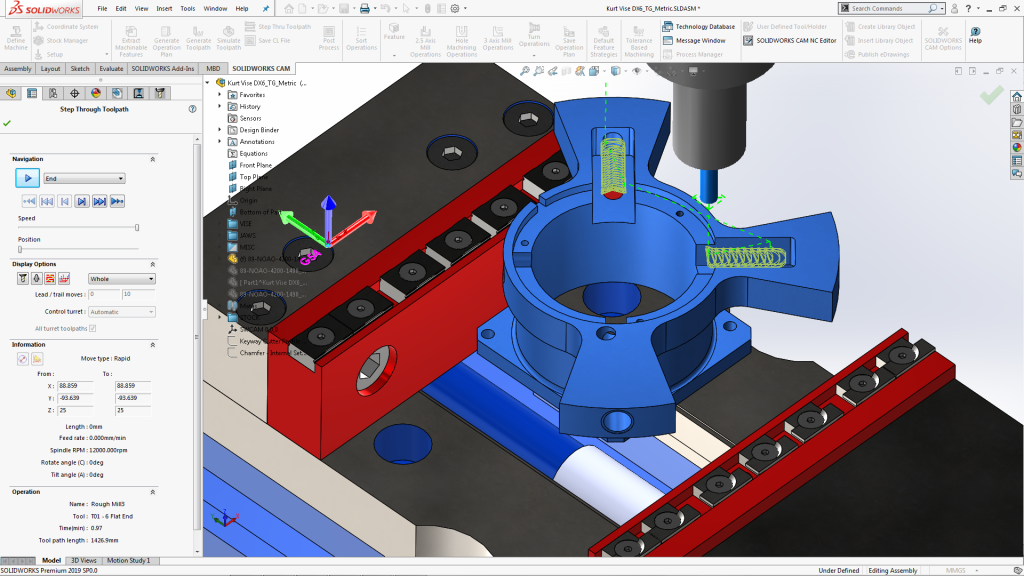
Product Evolution: Since its debut, SolidWorks CAM has evolved with each annual release of SOLIDWORKS. Initial capabilities focused on 2.5-axis milling (for prismatic parts) and 2-axis turning (lathe operations) at the part and assembly level. Over time, enhancements have included support for configurations, assembly machining (programming multiple parts or fixtures together), and indexing for multi-axis machines (often called 3+2 machining, where a 4th or 5th axis is used to orient the part). The CAM engine itself, being based on CAMWorks, brought in features like Automatic Feature Recognition and Knowledge-Based Machining from day one, but these have been refined. For example, later versions of SolidWorks CAM introduced better recognition of tolerances and surface finishes from the 3D model (often referred to as Tolerance-Based Machining), which allows the software to automatically adjust machining strategies based on the dimensional tolerances defined in the CAD model. This was part of a broader industry push toward model-based definition (MBD), where the 3D model carries manufacturing info. SolidWorks CAM leveraged that by reading tolerances and choosing appropriate fit (e.g. a tight tolerance hole might trigger a reaming operation automatically).
Dassault Systèmes and HCL Technologies have also continued to collaborate on expanding the CAM capabilities. In 2018, a partnership between HCL (which now develops CAMWorks) and additive manufacturing leader Materialise was announced to create a hybrid manufacturing platform. This initiative integrated Metal 3D printing preparation within the SolidWorks CAM/CAMWorks environment, allowing users to combine additive and subtractive processes in one workflow. It marked one of the first times an additive manufacturing tool was embedded alongside CAM in SOLIDWORKS, indicating the forward-looking evolution of the product toward emerging manufacturing methods.
By the early 2020s, SolidWorks CAM (and CAMWorks) also started to interface with Dassault’s 3DEXPERIENCE cloud platform. For instance, “CAMWorks for 3DEXPERIENCE SolidWorks” was introduced, enabling cloud-based collaboration and data management for CAM data. While the core functionality of SolidWorks CAM remains on the desktop within SOLIDWORKS, this shows an evolution toward connecting with Dassault Systèmes’ broader ecosystem (the 3DEXPERIENCE Works portfolio) for things like cloud storage of tool libraries or integration with other applications (such as DELMIA for manufacturing operations management).
Throughout its history, SolidWorks CAM’s development has been guided by user feedback and industry needs. Since many enhancements of SOLIDWORKS in general come from its famous yearly Top Ten List (voted on by users), features like improved toolpath simulation, custom post-processor support, and UI improvements in SolidWorks CAM were influenced by the active SOLIDWORKS community. In summary, what started as a response to the demand for integrated CAM in 2017 has steadily grown into a mature CAM solution. It remains focused on the original goal of uniting design and manufacturing, while gradually extending into new areas such as multi-axis machining, knowledge-based automation, and even additive manufacturing integration.
Business Performance and Market Impact
SolidWorks CAM’s impact is closely tied to the immense market presence of SOLIDWORKS 3D CAD. SOLIDWORKS is one of the most widely used CAD systems in the world: as of the mid-2020s, there are over 7 million SOLIDWORKS users in more than 80 countries. This includes a mix of professional engineers, designers, and students. Importantly, SOLIDWORKS is used by hundreds of thousands of companies globally – by 2017 it was reported that over 260,000 companies had active SOLIDWORKS installations, and that number has only grown since. This large user base gives SolidWorks CAM a huge potential reach. By bundling SolidWorks CAM Standard with the core software (for customers on maintenance plans), Dassault Systèmes instantly put CAM capabilities into the hands of a vast number of engineers who might not have previously used CAM software. This move effectively expanded the CAM market to more designers, potentially increasing the adoption of CNC programming in smaller design teams and companies that might have outsourced machining before.
While Dassault Systèmes does not break out SolidWorks CAM’s financial performance separately, the SolidWorks portfolio (which includes CAD and related tools) is a major contributor to Dassault’s revenue. Dassault Systèmes has annual revenues in the realm of $5–6 billion USD, and the SOLIDWORKS brand (categorized under the company’s “Mainstream Innovation” segment) accounts for a significant portion of that. In recent financial reports, the company noted double-digit growth driven by SOLIDWORKS sales, indicating strong market demand. The introduction of SolidWorks CAM likely played a role in adding value to SOLIDWORKS subscriptions, helping retain and attract customers who see the benefit of an all-in-one design and manufacturing solution. Offering integrated CAM also positioned Dassault to compete more directly with other CAD vendors that provide manufacturing solutions, potentially increasing market share in the CAM domain.
From a market reach standpoint, SolidWorks CAM targets primarily the mid-range CAD/CAM market – small to mid-sized manufacturing companies, job shops, and product design firms that use SOLIDWORKS. This is a huge segment worldwide, from independent machine shops to departments within large enterprises. By contrast, Dassault Systèmes also offers high-end manufacturing solutions (like DELMIA and CATIA CAM for enterprise-level, complex manufacturing scenarios), but SolidWorks CAM fills the need at the designer level, focusing on ease-of-use and quick results for common milling and turning operations. Its inclusion in SOLIDWORKS means that many educational institutions also have exposure to SolidWorks CAM, as schools and universities that teach SOLIDWORKS can introduce students to CAM programming using the same interface. This educational reach could translate into a new generation of engineers comfortable with integrated CAM, further entrenching the software in industry over time.
Another business aspect is the ecosystem effect: SOLIDWORKS has a vast network of value-added resellers and partners. Many of these resellers provide training and support for SolidWorks CAM, and some offer specialized CAM post-processors or machine-specific templates. This ensures that companies adopting SolidWorks CAM have resources to ramp up quickly. Furthermore, the move by Dassault to include CAM has influenced partnerships; for example, traditional stand-alone CAM vendors (like Mastercam, or others that integrate with SolidWorks) now face an official bundled competitor inside the CAD system. Some users still opt for more advanced stand-alone CAM systems for complex 5-axis or multi-tasking machining, but SolidWorks CAM covers a large percentage of typical needs, thereby capturing a broad portion of the CAM workflows within the SolidWorks community.
In terms of user numbers specific to SolidWorks CAM, Dassault Systèmes hasn’t released public figures (e.g., how many are actively programming with it). However, given that any of the millions of SOLIDWORKS users with a subscription can access it, the potential install base for SolidWorks CAM is enormous. Even a fraction of SOLIDWORKS users adopting it would make it one of the most-used CAM tools by seat count. The strategy appears to be long-term: introduce CAM to many users for basic needs (via the Standard version) and then some of those will upgrade to Professional as they require more advanced features. This freemium model within the existing customer base likely contributed to SolidWorks CAM being quickly recognized in industry surveys as a notable CAM solution shortly after its launch.
Notable Partnerships and Collaborations
SolidWorks CAM’s creation and growth have involved several key partnerships and corporate moves:
-
CAMWorks and HCL Technologies: The fundamental CAM technology in SolidWorks CAM comes from CAMWorks. CAMWorks was originally developed by Geometric Ltd., a company that had partnered with SOLIDWORKS since the late 1990s. In 2016, Geometric’s CAM division (including CAMWorks) was acquired by HCL Technologies, an India-based IT and engineering company. This acquisition was done in part to strengthen the development of CAMWorks and related manufacturing software. Dassault Systèmes worked closely with Geometric (and subsequently HCL) to license and integrate CAMWorks technology into SolidWorks CAM. This collaboration ensured that SolidWorks CAM launched with a mature and proven CAM engine. It also means that as CAMWorks continues to evolve (HCL releases new versions annually), those improvements can funnel into SolidWorks CAM. The partnership is such that CAMWorks itself remains available as a separate product (for use with other CAD systems or for users who prefer its standalone tools), while also being the backbone of SolidWorks CAM. This symbiotic relationship protects the interests of existing CAMWorks users and gives Dassault a fast track into CAM without developing everything from scratch.
-
Materialise Partnership for Hybrid Manufacturing: In June 2018, a notable collaboration was announced between HCL (CAMWorks) and Materialise, a Belgian company known for 3D printing software. The goal was to develop a unified platform for hybrid manufacturing (combining additive manufacturing with CNC machining) within the SolidWorks environment. Materialise contributed its expertise in additive manufacturing (AM) so that CAMWorks (and thus SolidWorks CAM) could incorporate features like adding support structures for 3D printing metal parts and planning additive toolpaths, all alongside subtractive toolpaths. This partnership resulted in a module where users could, for example, build up a part via metal 3D printing and then machine critical surfaces in the same setup. It represented an innovative step, as no major CAD platform at that time had a fully integrated solution for both AM and CAM. For SolidWorks CAM users, it meant the software was keeping pace with emerging manufacturing trends, extending its usefulness beyond traditional machining into new processes. While this hybrid module might be more niche, it underscores Dassault Systèmes’ strategy of collaborating with specialists (like Materialise) to enhance SolidWorks CAM’s capabilities in ways that meet future needs.
-
SOLIDWORKS Ecosystem and Reseller Network: Dassault Systèmes has fostered a strong reseller and partner ecosystem around SOLIDWORKS, and SolidWorks CAM is part of that. Since its introduction, official SOLIDWORKS resellers have been trained to support SolidWorks CAM and often partner with CNC machine tool companies or tooling companies for events and customer education. For instance, at user conferences or trade shows, one might see demonstrations of SolidWorks CAM in conjunction with a CNC machine vendor, showing live cutting of parts designed in SOLIDWORKS. There are also partnerships with training centers and certification programs – SolidWorks CAM skills are now included in some SOLIDWORKS certification exams and curriculum. All these collaborations help drive adoption by making sure that SolidWorks CAM is well-supported in the broader manufacturing community.
-
Integration with 3DEXPERIENCE Works: As Dassault Systèmes rolls out its 3DEXPERIENCE Works strategy (bringing SOLIDWORKS and related apps onto a connected cloud-based platform), SolidWorks CAM is also being woven into that fabric. The integration primarily revolves around data management and process coordination. A SolidWorks CAM user can save CAM toolpaths and setups to the 3DEXPERIENCE platform, enabling better collaboration (for example, a manufacturing engineer can access the CAM program from the cloud to review or edit, or link it with scheduling and shop-floor management tools like DELMIA). Additionally, Dassault’s other manufacturing software like DELMIA Shop Floor Programmer is being positioned to complement SolidWorks CAM for more advanced use cases. These efforts illustrate collaboration not just with external partners but internally between different Dassault product teams to ensure SolidWorks CAM works smoothly with the company’s other solutions. In the long run, this could mean a more unified experience where a SolidWorks user can move from design to toolpath to production planning all within a connected ecosystem.
Overall, partnerships have been crucial to SolidWorks CAM’s story – from the foundational technology (CAMWorks by Geometric/HCL), to innovation in new areas (Materialise for hybrid manufacturing), to the extensive support network via SOLIDWORKS resellers and other Dassault products. These collaborations and strategic moves have strengthened SolidWorks CAM’s offerings and integrated it more deeply into both the SOLIDWORKS community and the broader manufacturing technology landscape.
Features, Innovations and Strengths
SolidWorks CAM introduced several innovative features and leverages robust technology to stand out in the CAM software market. Some of the unique strengths and capabilities of SolidWorks CAM include:
-
Seamless CAD Integration: Unlike many CAM systems that operate as separate applications, SolidWorks CAM is fully embedded in the SolidWorks CAD interface. Users can switch from designing a part to programming its manufacturing operations with a single click. This seamless integration means there is a single file for design and machining instructions, reducing data translation errors. If the CAD model is modified, any associated toolpaths update automatically to reflect the change – a huge advantage for maintaining design-manufacturing consistency. This tight integration speeds up workflows, as there is no need to export/import models or deal with format compatibility issues.
-
Knowledge-Based Machining (KBM): SolidWorks CAM incorporates knowledge-based machining, which allows companies to capture their best practices and standardize them. At the heart of this is the Technology Database (TechDB), a database where users can define machining strategies for specific features or materials. For example, an organization can set a rule that any 10mm diameter through-hole with a certain tolerance should automatically be drilled with a specific tool and operation sequence. SolidWorks CAM will then apply that rule whenever it encounters such a feature. This rules-based machining approach means less manual programming and more consistency. New programmers can leverage the company’s pre-established processes, and quoting or estimating can be done more quickly because the software can apply known strategies to new designs.
-
Automatic Feature Recognition: A signature feature from CAMWorks that carries into SolidWorks CAM is Automatic Feature Recognition (AFR). When a user loads a part, the software can automatically identify machinable features on the model – such as pockets, bosses, holes, slots, etc. It then lists those features in a tree, much like features in the CAD model, but from a machining perspective. This saves significant time, as the programmer doesn’t have to manually sketch or select every region to machine. AFR works on native SolidWorks models and even on imported geometry, and it can recognize over 20 types of features. The benefit is a substantial reduction in programming time (in some cases the developers claim up to 90% time savings for feature-heavy parts, compared to defining features one by one in traditional CAM software).
-
Tolerance-Based Machining: SolidWorks CAM introduced Tolerance-Based Machining (TBM), which uses the geometric tolerances and dimensions (PMI data) in the 3D model to guide the machining strategy. For instance, if a hole is marked with a very tight diameter tolerance in the SolidWorks model, SolidWorks CAM can recognize that and automatically apply a finishing ream or boring operation after drilling, to ensure the tolerance can be met. Similarly, surface finish annotations might trigger a different toolpath style (like a finer step-over on a milling operation). This ability to read design intent from the model’s annotations is an innovation that reduces the communication gap between design and manufacturing. It helps ensure the part is made to the required specifications without the programmer needing to manually cross-reference drawings or notes – the software intelligently adapts the toolpaths to the tolerances.
-
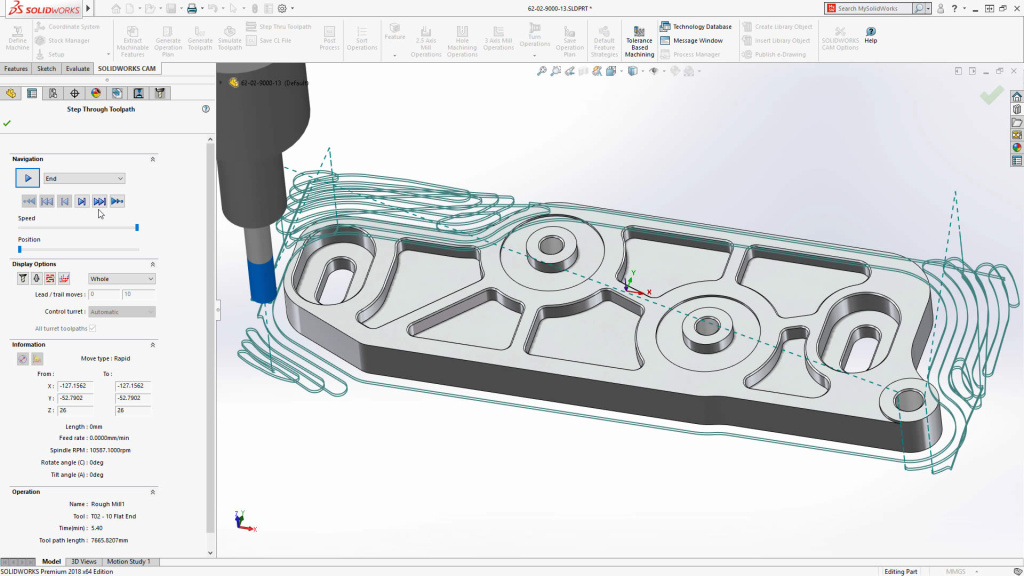
High-Speed Machining and Advanced Toolpaths: In its Professional version, SolidWorks CAM includes advanced toolpath strategies for efficiency, such as high-speed machining (HSM) toolpaths. One example is the inclusion of VoluMill® technology (through CAMWorks), which is an advanced high-speed roughing algorithm. VoluMill toolpaths remove material with an optimized pattern that maintains constant tool load, allowing significantly faster cutting and reduced wear on tools. These kinds of modern CAM strategies help reduce cycle times by a large margin (sometimes 50-80% faster roughing). SolidWorks CAM also supports 3+2 machining, meaning it can program 4-axis and 5-axis CNC machines in an indexed mode (the part can be rotated to different angles for machining different faces). While it does not do full simultaneous 5-axis toolpaths (which are rare in the Standard machine shops for which it’s intended), the 3+2 capability covers a majority of multi-face machining needs, like drilling holes on multiple sides of a part or milling features at various orientations.
-
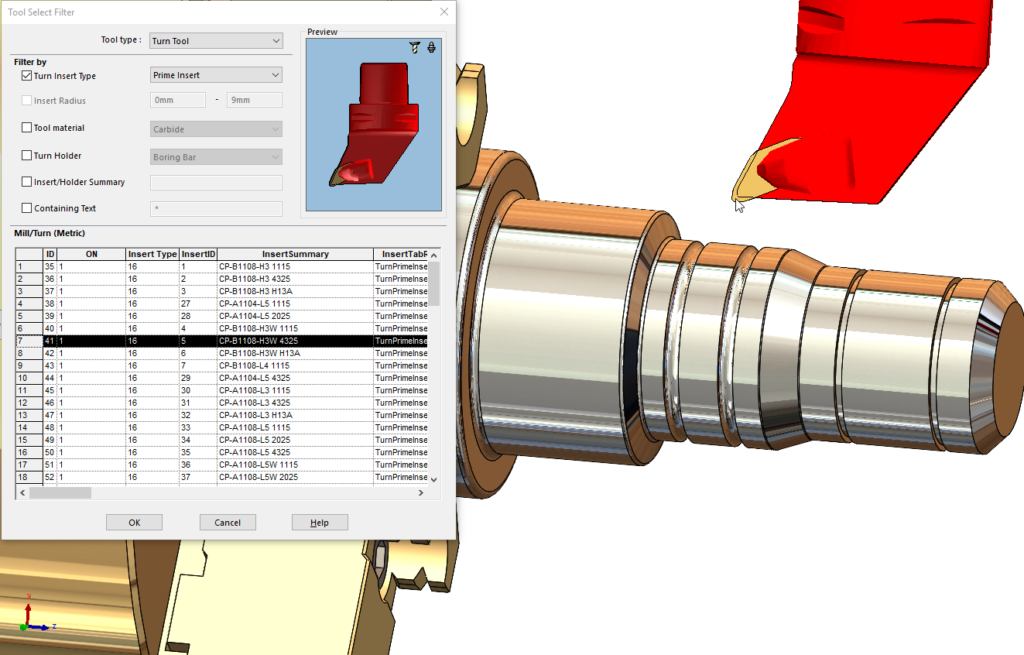
CNC Turning and Mill-Turn Support: In addition to milling, SolidWorks CAM Professional adds turning (lathe) operations support. Users can program OD/ID turning, facing, grooving, cutoff, and threading on a 2-axis lathe. They can also combine milling and turning operations for machines that have both (mill-turn machines), although for very complex multi-spindle, multi-turret lathes, more specialized CAM might be needed. Still, the inclusion of turning means SolidWorks CAM covers both major traditional machining processes, allowing shops that have mills and lathes to program both within one software environment.
-
User-Friendly Interface: Because SolidWorks CAM is an add-in to SolidWorks, it leverages the familiar UI of the CAD system. The operation tree, menus, and workflow feel consistent with what SolidWorks users are accustomed to. This lowers the learning curve. A design engineer who knows SolidWorks can start using SolidWorks CAM with minimal training, compared to learning an entirely new CAM software interface. Additionally, the simulation and verification tools are integrated – users can run toolpath simulations, check for collisions, and visualize the material removal all inside the same window. The simplicity and unification are big strengths, especially for organizations that want their engineers to wear multiple hats (design and NC programming) without investing in extensive CAM training.
-
Customization and Post-Processing: SolidWorks CAM comes with a variety of post-processors to output NC code for different CNC controllers (such as Fanuc, Haas, Siemens, etc.). Advanced users can edit or create custom post-processors to suit specific machine requirements, which is important because every shop might have slight variations in how they want the G-code. The software also allows customization of machining strategies and operations. While the automatic features and rules are there to speed things up, the user retains full control to override, add specific toolpaths, set tool selection preferences, and so on. This balance between automation and manual control is a strength – new or simple jobs can be done very fast with defaults, whereas experienced CAM programmers can fine-tune operations for more complex tasks.
-
Continuous Updates and Integration: As part of the SOLIDWORKS annual release cycle, SolidWorks CAM receives continuous updates. Recent versions have improved things like tool selection algorithms, more material library options, and better integration with SOLIDWORKS PDM (product data management) for managing CAM data alongside CAD files. Moreover, because it is part of the integrated suite, SolidWorks CAM plays nicely with other SOLIDWORKS tools – for example, one can use SOLIDWORKS Costing together with CAM to estimate machining costs, or use SOLIDWORKS Simulation to ensure a design is optimized before CAM is applied, and then quickly generate the toolpaths for the optimized design without starting over.
In summary, SolidWorks CAM’s main strengths lie in automation, integration, and ease of use. It brings intelligent machining features to a broad user base and emphasizes making CNC programming more accessible even to designers. The focus on rules and knowledge reuse means it can drastically cut down programming time for repeatable features. And being within SOLIDWORKS means it naturally fosters better communication between design engineers and manufacturing engineers – they’re effectively using the same software and looking at the same model, just in different modes. This cohesion is a strong advantage, as it reduces the silos between departments that often plague manufacturing workflows. As manufacturing continues to advance, SolidWorks CAM’s integration of new techniques (like the aforementioned hybrid manufacturing or tolerance-driven machining) shows that it aims to stay current with industry innovations while maintaining the core value of integrated CAD/CAM.
Executive Insights and Strategy
From the outset, SolidWorks CAM has been framed as more than just an additional feature; it is part of SOLIDWORKS’ strategy to enable “smart manufacturing.” Company executives have highlighted how integrating design and manufacturing fits into the broader mission of Dassault Systèmes and the SOLIDWORKS brand.
Gian Paolo Bassi, who led the SOLIDWORKS brand as CEO during the launch of SolidWorks CAM, often spoke about the importance of closing the loop between design and production. Reflecting on the 2018 release, he noted that the goal was to help customers bring products to market faster by eliminating disconnects in the workflow. “A successful consumer experience must have a well-designed product at its core and an efficient way to produce it,”Bassi said, underscoring that the company views design and manufacturing as intertwined aspects of delivering innovation. SolidWorks CAM was one of the tools introduced to ensure that once a product is designed, it can be efficiently and correctly fabricated with minimal extra steps or rework. Bassi touted that “as with past releases, many of SOLIDWORKS [2018]’s new tools and enhancements respond to the SOLIDWORKS community’s insight and feedback” – a nod to the user-driven development philosophy. This statement highlights that SolidWorks CAM itself was in large part a response to user requests over the years for integrated CAM capabilities.
When introducing SolidWorks CAM, Bassi characterized it not as Dassault entering the CAM market to compete head-on with all existing CAM vendors, but rather fulfilling a vision for smarter workflows. “This is not just another CAM product, nor do we pretend to own the manufacturing space. But it is, in our opinion, a ‘smart manufacturing’ solution,” he explained. By this, he meant the solution leverages model intelligence (tolerances, features) to automatically determine machining strategies – an approach aligning with the concept of making manufacturing smarter and more automated. The phrase “not just another CAM product” also conveys Dassault’s stance that the value of SolidWorks CAM lies in its integration and knowledge-based approach, not simply in adding yet another standalone CAM software to the market. It was about indicating a path forward for the industry on how CAD and CAM can be better integrated.
Dassault Systèmes’ top executives similarly tie products like SolidWorks CAM into the company’s mission. Dassault’s corporate mission statement describes the company as “a catalyst for human progress,” pioneering virtual technology to improve real-world outcomes. In practice, this mission means developing tools that enable innovators (their customers) to test and execute ideas digitally and efficiently. SolidWorks CAM fits into that because it extends the virtual prototyping into virtual manufacturing – you don’t just design the part digitally; you also simulate how to make it digitally. By doing so, Dassault aims to empower users to experience their product’s full lifecycle in a virtual space. This strategy is often referred to by CEO Bernard Charlès as part of the “Experience Economy,” where the experience of designing, making, and using a product is all connected.
In line with this, SOLIDWORKS executives have emphasized education and accessibility. SolidWorks CAM being included for all users with a subscription reflects a strategy to educate the broad user base on manufacturing considerations. By putting CAM on every engineer’s desktop, the company hopes to foster greater collaboration – designers start thinking like manufacturers and vice versa. Such democratization of CAM echoes a statement by Bassi’s team: “We’re indicating the path forward to our large ecosystem of manufacturing partners on how to better integrate CAM with design.” The integration is seen not only as a software feature but as a change in process and culture in engineering teams.
Manish Kumar, who took over as SOLIDWORKS CEO in more recent years, has continued this strategic direction. In presentations about the 3DEXPERIENCE Works portfolio, he has highlighted how tools like SolidWorks CAM (together with cloud-based manufacturing apps) will enable companies to be more agile and connected. The emphasis is on collaboration, innovation, and responsiveness – values that SolidWorks has championed. One of SOLIDWORKS’ slogans in the last decade has been “Innovation for all” – providing powerful capabilities to engineers at all levels. SolidWorks CAM’s inclusion in the standard toolkit is a prime example of that mantra, giving even small businesses or individual designers access to advanced manufacturing planning tools.
In summary, the messaging from company leadership around SolidWorks CAM centers on integration and empowering users. Executives view it as a critical piece in achieving a streamlined, smart manufacturing workflow that aligns with Dassault Systèmes’ mission to digitize and connect every aspect of product development. They stress that technology like this can be a “transformative force” in how products are made – turning a process that used to involve several disjointed steps into one continuous, intelligent cycle. From the top-level perspective, SolidWorks CAM helps fulfill the promise of the SOLIDWORKS brand: to not only design great products but also to manufacture them efficiently, all within a unified innovation platform.
Vendor: Dassault Systèmes